Join waitlist

Run your Wi-Fi business in one place.
Join the waitlist.

Veranet helps you sell internet plans, collect payments, and manage customer access from one dashboard. Sell plans, collect payments, and manage customer access in one place.

Join waitlist
Auto-Billing
Let customers buy plans without waiting for you.
Router Sync
Connect your MikroTik router and manage access.
Sales Overview
See your sales, customers, and revenue in one place.
Access Control
Manage vouchers and see who has network access.

Less daily admin. More time to grow.More time to grow.

From selling a plan to issuing access, Veranet brings your day-to-day Wi-Fi operations into one dashboard.

Router Sync

Connect your router. Manage access centrally.

Connect your MikroTik router to Veranet to manage hotspot plans and access credentials. Keep your customer records and network setup together as your business grows.

router-setup.example
ACTIVE
[SYSTEM]Connection established with cloud router manager.
[SYNC]Auto-created queue list for "Plan_Daily_5MB".
[LEASE]Leased IP 10.0.10.45 to Client "iPhone_15_Pro".
[LIMIT]Enforced 10Mbps rate limit rule for active interfaces.
Automated Revenue

Let customers pay and get their access details.

Customers can fund their wallets through Paystack, choose a plan, and receive their access details. You can also issue vouchers and track sales from your dashboard.

payment-example
EXAMPLE
+ ₦500 Daily Pack
SUCCESS
+ ₦2,000 Weekly Pack
SUCCESS
+ ₦150 1 Hour Pack
SUCCESS

The tools your Wi-Fi business needs

Manage access, build a familiar customer experience, and keep your locations organized.

verified-client-list VOUCHER ACCESS
MacBook Pro
Voucher #2841
Unknown Android
Blocked
iPhone 14
Voucher #9122
Samsung S20
Voucher #8822
HP EliteBook
Voucher #1042
iPad Pro
Blocked
MacBook Pro
Voucher #2841
Unknown Android
Blocked
iPhone 14
Voucher #9122
Samsung S20
Voucher #8822
HP EliteBook
Voucher #1042
iPad Pro
Blocked
Keep track of customer access. Manage available and assigned vouchers so you know which access details have been issued to your customers.
// theme config
accent: #10b981
name: "My ISP"
radius: "1.25rem"
// live rendering
Enter Voucher Code
Connect to Internet
Make it feel like your business. Set your business details and brand color to give customers a more familiar experience.
hotspot-locations MONITORING
Cloud ONLINE
Hotspot LOCATION 02
Bring your locations together. Organize your routers and hotspot locations in one dashboard, with a clear view of the business you are building.
COMPATIBLE WITH LEADING ROUTERS & PAYMENTS
Paystack
Flutterwave
Mobile Money
MikroTik
Ubiquiti UniFi
Cisco Systems
OpenWrt
Stripe
RADIUS Engine

Get your Wi-Fi business ready to sellGet ready to sell Wi-Fi

Connect your MikroTik router, create your plans, and give customers a simpler way to get online.

01

Connect your MikroTik

Add your router and location in Veranet, then follow the setup instructions to connect your hotspot.

02

Create your plans

Choose your plan prices, duration, and data allowances to suit the customers you serve.

03

Start selling access

Customers buy a plan and receive their access details. Follow purchases and revenue from your dashboard.

Veranet Fund Wallet App Preview
Veranet Plans App Preview
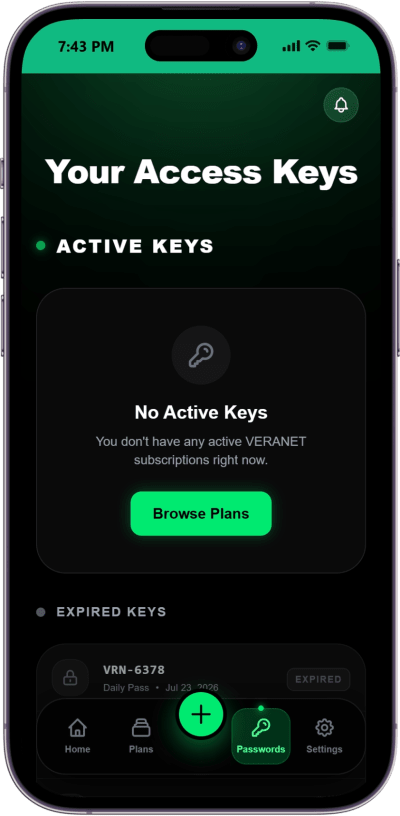
Veranet Access Keys App Preview

A simpler way for customers to pay

Give customers one place to check their balance, top up their wallet, and manage their internet plans.

Top up

Wallet payments

Customers select “Fund Wallet” and complete checkout through Paystack. Their balance updates after payment is confirmed.

Vera

Share with Vera Share

Customers can use Vera Share to share eligible plans with other customers on the network.

Your plans. Your prices.

Customers browse the packages you create and buy the plan that suits them using their wallet balance.

Flexible

Plans that fit your business

Set the price, data allowance, and duration of each plan, from short visits to regular subscribers.

Ready

Access after purchase

After a successful purchase, customers receive the access details for their plan without waiting for a manual message.

Access details customers can find themselves

Customers can find their hotspot credentials and review their plans in their account, reducing routine support requests.

Keys

Hotspot credentials

Customers can return to their account to find their access details whenever they need to connect.

Auto

Plan history

Customers can review past plans and choose their next package when they need more internet access.

Frequently asked questions

How do I connect my MikroTik router to Veranet?

Add your router and hotspot location in the Veranet dashboard, then follow the MikroTik setup instructions. If you need help with your current network configuration, contact us before making changes.

What payment methods are supported for customers?

Customers fund their wallets through Paystack and use their balance to buy plans. The payment methods shown at checkout depend on your Paystack configuration and region. You can also manage voucher sales from the dashboard.

Does the captive portal still work if the internet is down?

Veranet’s dashboard, online payments, and cloud services need an internet connection. Existing hotspot sessions depend on your router configuration. If your upstream internet connection goes down, Veranet cannot restore that connection.

Can I customize the customer experience?

You can set your business details and brand color, and create your own internet plans. Contact us to discuss any specific portal branding or customization you need.

Can I manage more than one hotspot location?

You can organize multiple hotspot locations and routers in your Veranet dashboard. Join the waitlist for launch access, or contact us to discuss the setup that fits your network.